
Computing and Online Safety at Bishopton
Computing and Online Safety at Bishopton
PURPLE MASH SCHEME OF WORK
At Bishopton we follow the Purple Mash Scheme of work for computing. We are committed to continually meeting the evolving needs of our learners and changes in the curriculum. Every lesson in the scheme has been recently rewritten to reflect current educational priorities and the rapid pace of change in the digital world. Adjustments to the previous scheme have been made to the number and content of lessons within certain units whilst some lessons have been streamlined for clarity. A number have been expanded to provide deeper learning opportunities for our more able pupils who excel in their computing studies. In addition, several new units have been added to the scheme to reflect both recent technological tools and the latest additions in curriculum focus.
Long Term Plan Computing Units – All Year Groups
Purple Mash Scheme of Work - Unit Overviews - All Year Groups
Computing is an essential part of daily life. At Bishopton Primary School we aim, through the use of a range of equipment e.g. laptops, iPads, micro-bits, interactive whiteboards to teach children the necessary skills they need to become confident and capable users of Computing and ICT equipment.
The Computing Curriculum is broken up into three different categories.
Digital Literacy
- recognise common uses of information technology beyond school
- learn to challenge and question information on the internet for its validity
- use technology safely and respectfully, keeping personal information private; identify where to go for help and support when they have concerns about content or contact on the internet or other online technologies
Information Technology
- use technology purposefully to create, organise, store, manipulate and retrieve digital content
Computer Science
- understand what algorithms are; how they are implemented as programs on digital devices; and that programs execute by following precise and unambiguous instructions create and debug simple programs
- use logical reasoning to predict the behaviour of simple programs
We hope our children leave our school with skills of digital literacy at a level suitable for the future workplace and as active, safe participants in a digital world.

CEOP is here to keep children safe from sexual abuse and grooming online. You can make a report directly to the CEOP Safety Centre by clicking on the Click CEOP button if something has happened online which has made you feel unsafe, scared or worried. This might be from someone you know in real life, or someone you have only ever met online. CEOP take all reports seriously and we will do everything we can to keep you safe. As well as making a report to the CEOP Safety Centre, the CEOP Education website has information and advice to help you if something has happened to you online. Are you being bullied? CEOP are unable to respond to reports about bullying but if you’re being bullied and would like to talk to someone in confidence right now you can speak to Childline on 0800 1111 or talk to them online – no worry is too big or too small.
At Bishopton Primary School, we follow the 'Education in a Connected World' framework to equip our children for a digital life. This document is weaved and embedded into half termly online safety lessons, PSHE, SMSC, RSE and assemblies.
The Education for a Connected World framework describes the Digital knowledge and skills that children and young people should have the opportunity to develop at different ages and stages of their lives. It highlights what a child should know in terms of current online technology, its influence on behaviour and development, and what skills they need to be able to navigate it.
The document supports one of the key aims of the government’s Internet Safety Strategy of supporting children to stay safe and make a positive contribution online, as well enabling teachers to develop effective strategies for understanding and handling online risks.
It is split into 8 areas which are used from Reception onwards.
Bishopton School takes the subject of online safety very seriously. All children take part in an online safety lesson half termly and online safety is planned into computing lessons where applicable. In addition, the school takes part in the annual Internet Safety Day, where pupils complete activities designed to keep them safe when using a range of internet connected devices. Staff attend training sessions which help to be updated on the latest information and resources available.
Our online safety, mobile phone and internet policies can be found in the 'Policy' section of the website.
ONLINE SAFETY OBJECTIVES – ALL YEAR GROUPS
Mobile Phones Information
Our pupils have designed these posters for safe computer use at Bishopton.
computing-and-online-safety-at-bishopton


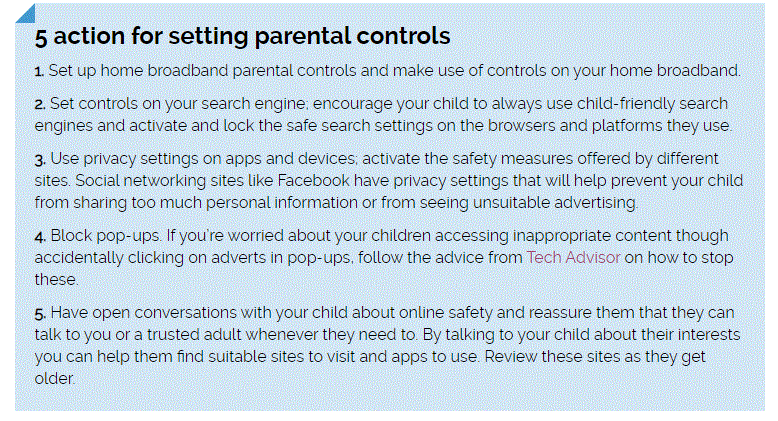
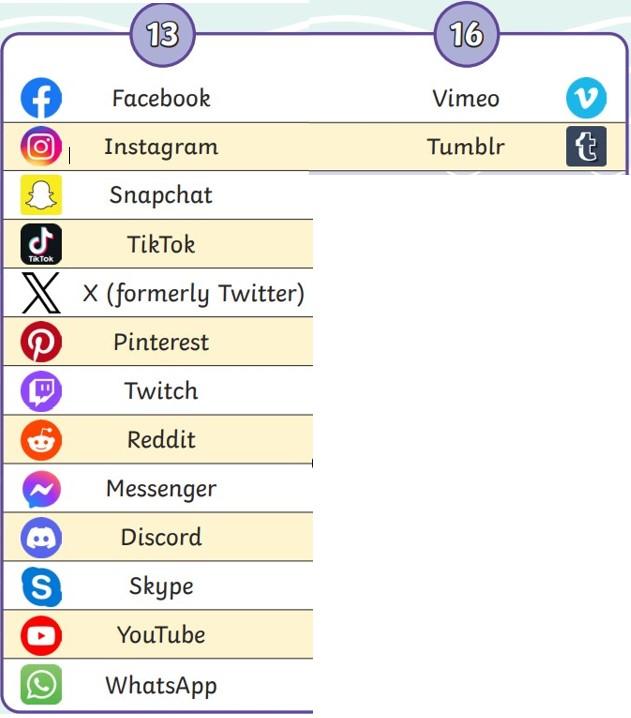
Useful Information - Parental Controls and Help Guides for Devices
Here are the National Online Safety’s top tips for checking and monitoring age ratings:
1) Do your research
If you’ve noticed a new game that your child has downloaded then use quality resources to make sure that your knowledge is up to date. Online websites, such as National Online Safety, can provide you with the information you need.
2) Review parental controls
Review your parental controls on the stores where you buy games from. Most sites allow parents to set passwords to block games with certain age restrictions from being downloaded.
3) Encourage open dialogue
Encourage open dialogue with your child. You don’t want to be in position where they won’t talk to you if something has made them feel uncomfortable in a game because they are worried they will get in trouble for playing the game in the first place.
4) Discuss ratings
Talk to your child about why the game has been awarded a certain label. Debate the positives and negatives of playing a game and decide on some ground rules together - please visit https://pegi.info for more information on suitable video games and their age ratings.
- Cyberbullying Powerpoint Assembly.pdfPDF File
- Parental Control Guide for Android Phone.zipZIP File
- Parental Control Guide for iPhone.zipZIP File
- Parental Controls Booklet2023.zipZIP File
- ROBLOX Parent Control Guide.zipZIP File
- PARENT GUIDE TO TIK TOK.zipZIP File
- Age Requirements for Social Media.zipZIP File
- Internet-Matters-Age-Guide-6-10s-Jan23.zipZIP File
- Internet-Matters-Balancing-Screen-Time-guide-Jan23.zipZIP File
- Internet-Matters-Discovering-Digital-Primary-guide-Jan2023.zipZIP File